|
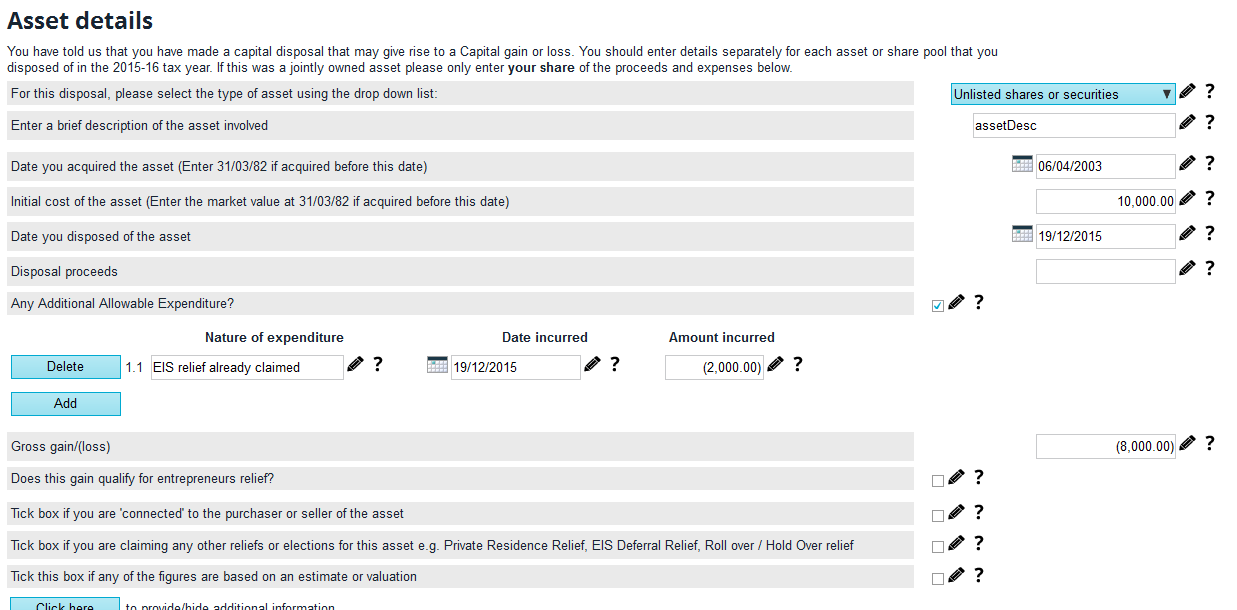
If income tax relief has been claimed at a certain percentage, then the CGT disposal also needs to be updated to state that the applicable percentage has been claimed. To do this in TaxCalc, we recommend that you enter the full cost and then enter the percentage that has been claimed as a negative expense. The reason for this is so that the information is included within the Capital Gains PDF document, which is in turn attached to the return for HMRC's reference. To declare this information in the return, it is recommended that you use SimpleStep mode. Please note that this is the only way TaxCalc can generate the PDF document for the Capital Gains pages. You should go to Capital Gains Tax > Asset Details and start to declare the entries. Example: In 2003 you subscribed to £10,000 for shares and claimed EIS Income Tax relief of £2,000 (£10,000 at 20%). In 2019 the company fails and you make a negligible value claim. You can claim loss relief of £8,000 (£10,000 less £2,000). Please refer to the following Asset details screenshot to see where to enter these details in TaxCalc. There is further information on the HS286 on HMRC's website. |