HMRC claim that so long as box 45 (Claim or relief affecting an earlier period) is ticked on the current year return, you should not need to re-file the amendment for the earlier year. This being said, customers have previously reported that although this box is ticked, the repayment has not been issued and therefore an amendment of the earlier year was required to issue this. The below instructions should provide you with the information required to proceed.
For more information on timescales of filing amendments, please see the article for What tax years can I file online?
If the window for amendment of the earlier return has closed (i.e. in excess of 12 months after the filing deadline), you should write to your company's Corporation Tax office including:
- The name of your company or organisation
- The period when the loss is made
- The amount of the loss
- How the loss is to be used
Entries to make on a current year return (2019 form)
HMRC Forms Mode: (Version 3)
Step 1: Within the CT600 > Go to CT600 Core > Page 1 > Tick Box 45

Step 2:
- Go to CT600 Core > Computations > Losses, Management Expenses, NTLRDs and NTLIFA’s >Trading Losses > Insert the loss in the box for ‘‘Carried back against profits of a previous period’’
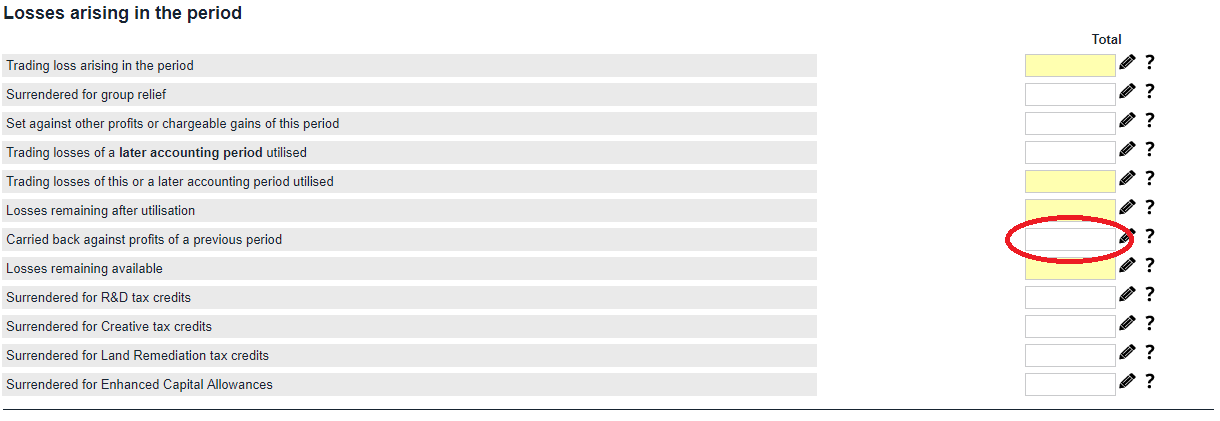
Step 2:
- Go to Finalising the return
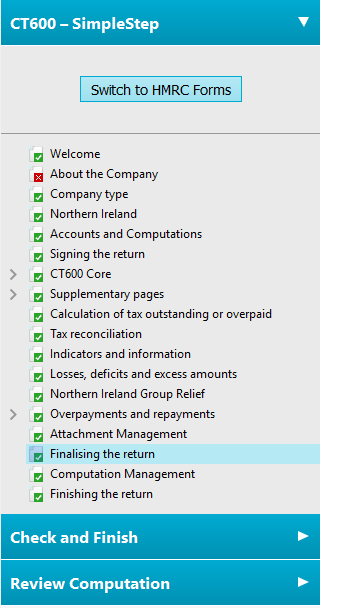
- Tick the box for ‘’an earlier period?’’

Please note:
Once these entries are completed, you may then process the submission as necessary. If you would like to process an amendment for the earlier year, please complete the below instructions. Please note there are 2 options because of the different forms that are available for use. (However, the most common period ends will be the version 3 form, which are periods starting on or after the 01/04/15).
Entries to make on a previous year return: - Return period starting on or after 01/04/15
HMRC Forms mode (Version 3)
Step 1)
- Go to CT600 Core > Core > Page 1 > Tick Box 40
Step 2)
- Go to CT600 Core > Core > Page 6 > Insert the corporation tax previously paid, into Box 595
Step 3)
- Go to CT600 Core > Computations > Losses, Management Expenses, NTLRDs and NTLIFAs > Trading Losses > Insert the loss in the box for ‘’Trading losses of a later accounting period utilised’’
Step 4)
- Complete the additional boxes on CT600 Core > Page 10 and as appropriate
Step 5)
- If you want to add any notes (that would usually be covered in an additional information box) please click on: Review Computation > Edit Notes > Select the location where you want to place the information save this as required
Simple Step mode (Version 3)
Step 1)
- Go to CT600 Core > Losses, Management Expenses, NTLRDs and NTLIFAs > Trading Losses > Insert the loss in the box for ‘’Trading losses of a later accounting period utilised’’
Step 2)
- Go to Tax reconciliation and insert the corporation tax previously paid into Box 595
Step 3)
- Go to Overpayments and repayments, then complete this section as appropriate
Step 4)
- Go to Finalising the return and tick the box for ‘’this return period?’’
Step 5)
- If you want to add any notes (that would usually be covered in an additional information box): Please go to Review Computation > Edit Notes > Select the location where you want to place the information save this as required
Step 6)
- Re-submit a full return for a refund of the difference in Corporation Tax – For instructions on how to submit an amended return please see the following knowledge-based article: How do I resubmit a return or file an amended return?
Entries to make on a current year return (Prior to 01/04/15)
HMRC Forms mode (Version 2)
- Go to CT600 > Computations > Trading losses record
- Insert the loss figure into the box labelled "Trading losses of a later accounting period utilised"
- Go to CT600 Full/Short > Page 1 and tick the box for "A repayment is due for this return period"
- Then go to
- Full > Page 5 > Complete box 91
- Short > Page 3 > Complete box 91
- Then go to
- Full > Page 8 and complete the necessary details
- Short > Page 4 and complete the necessary details.
- Re-submit a full return for a refund of the difference in Corporation Tax – Please note, this will have to be done via a paper submission.
Simple Step mode (Version 2)
- Go to CT600 full/short > Trade and Professional Income > Trading Losses Record
- Insert the loss figure into the box labelled "Trading losses of a later accounting period utilised"
- Go to Tax reconciliation and insert the corporation tax previously paid into box 91.
- Go to Overpayments and repayments and complete this section, as applicable.
- Go to Finalising the return and tick the box for "this return period?"
Re-submit a full return for a refund of the difference in Corporation Tax – Please note: this will have to be done via a paper submission.